
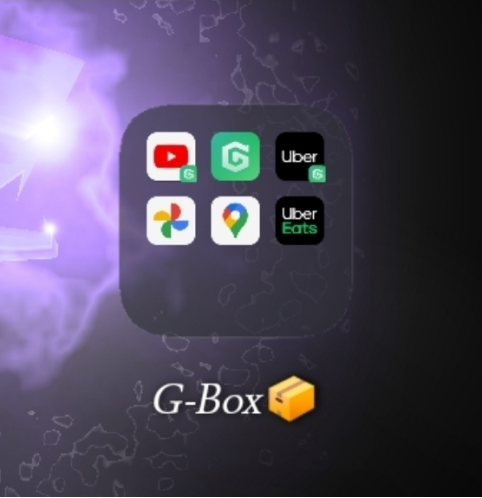
GBox offers a unique solution for Huawei users seeking access to Google services without hassle. It bridges the gap between Huawei devices and Google apps by creating a virtual environment. This innovation allows the installation and smooth operation of Google apps on Huawei phones, which is crucial in a tech ecosystem where Google Mobile Services (GMS) play an essential role. With its user-friendly interface and seamless functionality, GBox is transforming the Huawei user experience, bringing back the familiar convenience of Google apps. Let’s delve into how GBox operates, its core features, and the significant advantages it offers to Huawei users globally.
How GBox Works: Key Features and Processes
Virtual Environment and App Container
At the heart of GBox lies a robust virtual environment that acts as an app container. It creates a sandboxed space within Huawei devices, where Google apps can function normally. This virtual environment mimics the functionalities of a device running GMS, offering users a seamless experience. Within this container, GBox provides the necessary system libraries that ensure Google apps perform effectively. By doing so, it isolates these applications from the device’s native system, safeguarding data privacy and security. This isolation ensures that neither Google’s apps nor Huawei’s software interferes with the other, maintaining optimal performance on both ends and delivering a seamless user experience.
Installing Google Apps Inside GBox
The process of installing Google apps within GBox is straightforward and user-centric. Once GBox is set up, users can conveniently download Google apps directly through it. The virtual environment acts as a Google Play substitute, allowing app installations as if they were being performed on a device running standard GMS. Users simply need to search for and click on the desired app, and the internal GBox system handles the rest. This method ensures that all Google apps remain up-to-date and fully functional, echoing the experience of using Google Play. It streamlines the process, bringing the extensive suite of Google applications right to Huawei users.
Google Account Login and Sync in GBox
Logging into a Google Account through GBox mirrors the familiar process seen on GMS-enabled devices. Users enter their credentials within the contained environment, and GBox securely syncs data across installed Google apps. This synchronization includes email, contacts, and calendar entries, which are crucial for daily productivity. The virtual environment ensures that these personal details remain confidential, allowing seamless integration without compromising data integrity. By maintaining synchronization, GBox effectively bridges the Huawei-Google divide, ensuring that users don’t miss out on essential synchronization features expected in Google-dependent environments.
How GBox Handles Permissions and Background Tasks
GBox’s sophisticated handling of app permissions and background tasks demonstrates its robust capability system. Within the virtual environment, users have granular control over permissions granted to Google apps, much like on other Android systems. GBox keeps background tasks efficient, allowing apps to run smoothly without draining the phone’s resources. It manages each app’s background activity, ensuring no unnecessary processes consume battery life or data. By prioritizing essential tasks and curtailing extraneous operations, GBox achieves a balance between performance and resource efficiency. This careful management results in a stable and reliable user experience for those relying heavily on Google services.
Benefits of Using GBox on Huawei Phones
Easy Access to Essential Google Apps
GBox simplifies accessibility for Huawei users by enabling easy access to essential Google apps without requiring complex workarounds. Users can operate popular apps like Gmail, Google Maps, and YouTube as seamlessly as on any standard Android device. The intuitive interface of GBox mirrors the conventional usage of Google’s suite of applications, ensuring users face no learning curve. By providing direct access to these crucial tools, gbox huawei enhances the utility of Huawei devices, accommodating the increasing demands of work, communication, and entertainment. This efficiency stems from GBox’s core objective: bridging the gap between Huawei hardware and the Google ecosystem.
No Root or System Modifications Needed
One of the primary advantages of using GBox is its non-intrusive nature. Unlike many alternatives that require rooting or altering the native system, GBox runs independently, preserving the device’s warranty and security integrity. This approach greatly simplifies the process, making it accessible to non-technical users seeking Google apps. Eliminating the need for system modifications means users can benefit from Google services without jeopardizing their device’s stability or security. This non-invasive strategy not only protects the device but also assures users of a straightforward, safe integration of Google apps into their daily digital interactions.
Stable Use and Lower Battery Impact Compared to Alternatives
Compared to other workarounds, GBox provides stable and efficient use with minimal impact on battery life. Its optimized environment ensures that background tasks are well-managed, preventing unnecessary drain on resources. By allocating system resources judiciously, GBox maintains the reliability of installed Google apps, ensuring they function without hiccups. This optimization is crucial for users who rely on their devices for extended periods, as it prolongs battery life and ensures consistent performance. GBox caters to these needs by providing a sustainable and effective method for accessing Google services on Huawei devices.
Conclusion
GBox revolutionizes the Huawei user experience by seamlessly integrating Google apps without complex configurations. It provides a safe, efficient, and user-friendly means to connect with essential Google services, enhancing the functionality of Huawei devices. By creating a virtual environment that supports these applications, GBox eliminates the need for complicated system modifications, maintaining the integrity and security of devices. Its practical approach ensures stable operation, conserving battery life while delivering a full suite of Google functionalities. For Huawei users, GBox is an invaluable tool, bridging the gap between hardware and software ecosystems for an enriched digital experience.