
Huawei phone users often face challenges with accessing Google Play apps. Although these devices are powerful and feature-rich, the absence of Google support can be limiting. But don’t worry! There are numerous workarounds for this issue. This blog will introduce effective methods to access Google Play apps on Huawei phones without compromising safety or performance. Discover strategies such as GBox, microG combined with Aurora Store, APK installations, and more, ensuring you make the most of your Huawei device in 2026.

Top Google Play Workaround Methods
For users searching for practical solutions to install apps from google play store huawei devices no longer supported by default, the following methods offer reliable and secure alternatives.
GBox: Virtual Environment for Google Apps
GBox offers a virtual environment that mimics Google apps’ functionality on Huawei phones. This solution is particularly effective because it doesn’t require deep system modifications, creating a safe sandbox where users can install and run Google Play apps. GBox operates as a separate module, mirroring the Google Play features without affecting the core functions of the device. Easy installation and minimal setup time make it a favorite among users seeking reliability and simplicity. It’s a straightforward approach that caters to users who prefer maintaining device integrity while enjoying Google apps.
microG + Aurora Store: Full Services Emulation
Combining microG with Aurora Store offers a powerful workaround for accessing Google Play services. MicroG serves as an open-source framework that mimics the necessary Google services APIs, allowing apps that depend on Google infrastructure to function correctly. Paired with Aurora Store, this setup grants Huawei users access to a wide array of apps, similar to being on Google Play. This method is a bit more involved, requiring users to install microG first, then utilize Aurora Store for app access. It’s suitable for tech-savvy individuals who value a full-featured solution with extensive app compatibility.
Direct APK Installation of Play Store and Services
Direct APK installation provides a straightforward method for loading the Google Play Store and its services onto Huawei devices. Users can manually download Google Play APK files and install them directly on their phones. This approach requires caution, as users must ensure APKs come from reputable sources to avoid malware risks. While this method doesn’t provide the full repertoire of Google services support, it’s effective for accessing essential apps. Direct APK installation appeals to those who prefer straightforward techniques without complex configurations.
Other Tools (like GSpace & VMOS)
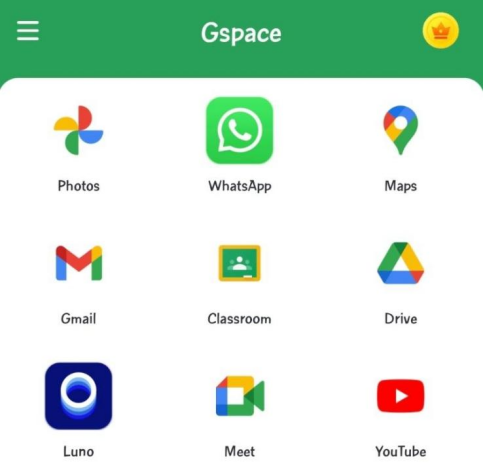
Tools like GSpace and VMOS offer alternative routes for accessing Google apps. GSpace creates a virtual environment resembling older Android versions, providing access to Google services. Meanwhile, VMOS installs a virtual Android system on Huawei phones, allowing Google apps installation. Both solutions are excellent choices for those who enjoy experimenting with tech and seek flexibility in their setup. GSpace and VMOS offer comprehensive support for Google apps, making them ideal options for users comfortable navigating virtual environments on their devices.
Best Practices for Safe Play Workarounds
To ensure you safely implement these workarounds, follow these best practices.
Use Trusted Sources and Avoid Malware
Using credible sources is crucial when searching for workaround tools and APK files. Websites like APKMirror and trusted forums are recommended to avoid malware that could compromise your device’s security. Verify sources before downloading any tools or apps, ensuring they have been reviewed and rated positively by other users. This diligence in selecting reputable sources helps maintain the security and integrity of your Huawei device while accessing Google Play services.
Backup Your Data Before Changes
Always back up your Huawei device data before making system changes. Safeguard your photos, contacts, apps, and other critical data to prevent potential loss during the installation and setup of workaround methods. Using built-in backup tools or third-party apps allows for easy restoration should something go awry. Prioritizing data security not only protects important files but also provides peace of mind, enabling users to experiment with different solutions confidently.
Keep Workaround Tools Updated
Regularly update all workaround tools to ensure they function properly and remain secure over time. Developers frequently release updates to patch security vulnerabilities, fix bugs, and improve overall efficiency and compatibility. By keeping GBox, microG, or any alternative solution up to date, users significantly reduce the risks associated with outdated software. Staying current with updates also unlocks new features, enhances stability, and maintains reliable access to Google Play services on Huawei phones, ensuring optimal performance, safety, and long-term usability.
Conclusion
Navigating the absence of Google Play services on Huawei phones can be challenging, but effective workarounds exist. Options such as GBox, microG + Aurora Store, and direct APK installation empower users to enjoy Google apps safely and efficiently. By leveraging trusted sources, backing up data, and ensuring regular updates, users can safely explore these solutions. Huawei users now have pathways to enhance their device functionality, enabling them to access essential Google Play apps conveniently and securely in 2026.